Ford Bronco Puzzle Game
Reviews
Ford Bronco 4-Door Puzzle Online Game delivers a polished jigsaw experience with crisp vehicle images. The four difficulty levels provide good replay value, allowing players to progress from quick puzzles to more demanding ones. Controls are responsive on both mouse and touch devices. The full-screen mode enhances immersion. It is a dependable, ad-friendly game that offers calm entertainment without pressure or distractions. Ideal for puzzle lovers of any age.
About this game
Game Introduction
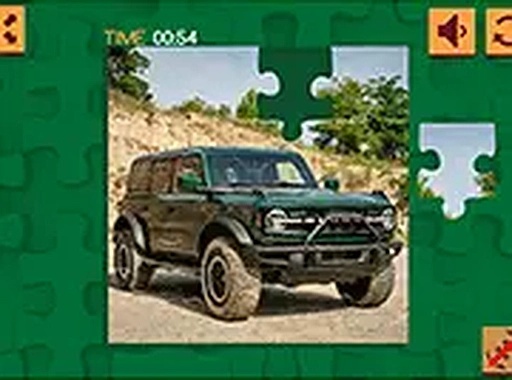
Ford Bronco 4-Door Puzzle Online Game is a browser-based jigsaw puzzle that lets you assemble images of the iconic Ford Bronco 4-Door. Designed for players of all ages, it offers a calm and engaging experience. You can choose from multiple Bronco images and select a difficulty level that suits your mood, from quick solves to more challenging puzzles. The game is completely free and requires no downloads, making it easy to start playing immediately. Whether you are a puzzle enthusiast or just looking for a relaxing activity, this game provides a safe, family-friendly environment to sharpen your focus and enjoy some quiet time.
How to Play
Playing Ford Bronco 4-Door Puzzle is straightforward. First, select one of the available Ford Bronco images you want to solve. Next, choose your preferred puzzle size from the options: 16, 36, 64, or 100 pieces. Once the puzzle loads, simply click and drag each piece with your mouse, or use your finger on a touch screen, to move it to the correct spot. Pieces snap into place when they are close to their correct position, making the process smooth and satisfying. You can also switch to full-screen mode for a more immersive view. The game works perfectly on both desktop computers and mobile devices, so you can play at home or on the go. Complete the puzzle at your own pace, and feel free to try different images and difficulty levels for variety.
Game Features
Family-friendly content suitable for all ages. Multiple difficulty modes from 16 to 100 pieces. Compatible with desktop and mobile browsers. Free to play with no hidden costs. Full-screen option for an enhanced experience. Smooth drag-and-drop controls with snap-to-fit mechanics.
Tips for Success
To get the most out of the game, start with a lower piece count like 16 or 36 to get comfortable with the controls and image. Focus on assembling the edges first, as they provide a clear frame for the rest of the puzzle. Look for distinct colors or patterns in the image to group pieces. Take breaks if you feel stuck—sometimes a fresh perspective helps. Finally, try different images to keep the experience varied and enjoyable.