Upside Down Brick Puzzle Arcade

Upside Down Brick Puzzle Arcade

Developer: Hot Pixel Dev
Published: 2024-05-12
Updated: 2026-06-06
Arcade Classic Puzzle

Reviews

Upside Down offers a refreshing take on puzzle games by reversing the shooting direction. The controls are intuitive, and the game runs smoothly on any device. Its pick-up-and-play nature makes it ideal for short breaks, while the challenge of clearing lines keeps you coming back for more. The full screen mode adds to the experience, and the lack of downloads is a plus.

About this game

Game Introduction

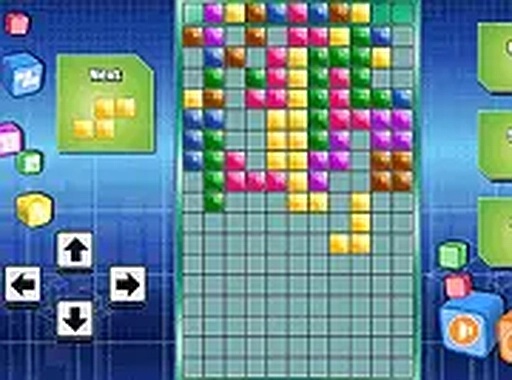
Upside Down Brick Shooting Puzzle Game is an arcade puzzle game that reimagines classic brick-breaking gameplay. Instead of the traditional top-down approach, players shoot bricks upward to complete horizontal lines and clear the board. This twist on a familiar formula offers a fresh challenge for fans of puzzle and arcade games. The game is designed for quick, casual sessions and runs directly in your browser on both mobile devices and desktop computers, with no downloads or installations required. It is completely free to play and can be enjoyed in full screen mode for a more immersive experience.

How to Play

Players control a paddle or shooter at the bottom of the screen, aiming and launching bricks upward. The objective is to strategically place bricks to form complete horizontal lines, which then disappear and clear space on the board. On desktop, players typically use keyboard keys to move and rotate the bricks and a designated button to shoot them. On touchscreen devices, players can tap and drag to control the bricks. The controls are responsive and easy to learn, allowing players of all ages to jump right in and have fun. The game may include a gradual increase in difficulty as the board fills up, requiring quick thinking and careful planning.

Game Features

Key features include a fun brick-shooting puzzle gameplay that reverses traditional direction, making it a unique arcade experience. The game is playable on both mobile and desktop devices without any download or installation—just open your browser and start playing. A full screen mode is available for a more focused and immersive session. The game is free to play with no hidden costs, making it accessible to everyone. As a classic-style arcade puzzle game, it may include a scoring system and increasing difficulty levels to keep players engaged.

Tips for Success

To succeed in Upside Down, practice aiming and timing your shots to place bricks where they are most needed. Plan ahead by looking at the board and thinking about where each brick will fit best to complete lines. Try to clear lines quickly to prevent the board from filling up. If you are playing on a touchscreen, experiment with tap and drag controls to find the most comfortable method. Regular practice will help you improve your speed and accuracy, making it easier to achieve higher scores.

Compatibility:


✅ Works on PC & Mobile | Recommended: Chrome / Safari / Edge

Advertisement

Faq

Is this game suitable for children?
Yes, the game is designed with simple controls and non-violent puzzle gameplay, making it appropriate for players of all ages. It offers a fun and engaging mental challenge without any mature content.
Do I need to create an account to play?
No account or registration is required. The game runs directly in your browser and is free to play without any sign-up process. Just open the page and start playing immediately.
Can I play this game offline?
The game is designed to run in a browser and typically requires an internet connection to load. Once loaded, some browsers may allow limited offline play, but for the best experience, an active connection is recommended.
Are there any in-app purchases or ads?
The game is described as completely free to play with no hidden costs. It may include advertisements as a way to support free gameplay, but there are no mandatory purchases to enjoy the full experience.
What devices are supported?
The game works on any device with a modern web browser, including smartphones, tablets, laptops, and desktop computers. It is optimized for both touchscreen and keyboard/mouse controls.
How do I switch to full screen mode?
Most browsers have a full screen option accessible through a button in the game interface or by pressing a key like F11 on desktop. On mobile devices, you may need to rotate your device or tap a full screen icon if available.

Similiar Product

Fruit Stack Match 3 Puzzle Game Online - Puzzle Game

Arcade Classic Class

Simple and relaxing match-3 game. Unlocking new fruits adds a nice sense of progress.

PLAY NOW

Click the Circle Reflex Challenge

Arcade Classic Reflex

Clean design and smooth gameplay. Great for short breaks and improving reaction time.

PLAY NOW

Secret Double Klondike Solitaire Online Card Game

Arcade Classic Class

A clever solitaire variation with eight foundations. Clean design and smooth gameplay. Perfect for short breaks.

PLAY NOW

Radioactive Ant Arcade Game

Arcade Classic Class

Charming and easy to play. The growth mechanic is satisfying and keeps you coming back.

PLAY NOW

Hangman Challenge Winter Word Puzzle Game Online - Word Puzzle Game

Arcade Classic Class

Clean design and smooth gameplay. Great for short breaks. Winter theme adds charm.

PLAY NOW

Balloons and Scissors Puzzle Game

Arcade Classic Puzzle

Clean design and smooth gameplay. Great for short breaks. 20 levels of fun puzzles.

PLAY NOW

Bop the Blox Online Arcade Game

Arcade Classic Class

Fast, colorful, and easy to play. Perfect for quick gaming sessions.

PLAY NOW

Fruit Hunt! Online Score Arcade Game

Arcade Classic Class

Clean fruit collection game with simple controls. Good for quick, family-friendly play sessions.

PLAY NOW