
Description
Sound Layering Basics
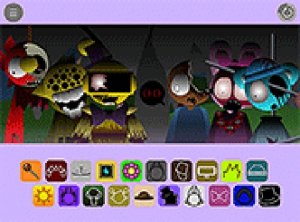
At the heart of Melody Maker Studio is a simple concept: each character you place on the screen produces a distinct audio element. These elements range from gentle bass lines to lively percussive beats. By adding multiple characters, you stack these sounds to form a complete musical piece. The system is designed for instant feedback, so every adjustment you make is heard immediately. This encourages experimentation without fear of making mistakes.
Character Selection and Audio Palette
The game provides a collection of characters, each tied to a specific sound. You might find a character that plays a soft melody, another that contributes a steady rhythm, and a third that adds a harmonic layer. The variety allows for countless combinations, from simple two-element loops to complex arrangements with multiple layers. The audio samples are updated regularly, keeping the experience fresh for returning players.
Interface and Accessibility
Melody Maker Studio runs directly in web browsers on both desktop and mobile devices. On a computer, you use a mouse to click and drag characters onto the play area. On a touchscreen device, you use your finger for the same actions. The interface is clean and uncluttered, with a full-screen option available for a more immersive session. There are no scores, timers, or objectives, which removes any pressure and allows you to focus purely on sound creation.
Creative Freedom and Relaxation
The game is built around open-ended exploration. You can spend as much time as you like listening to individual sounds before combining them. Removing a character instantly alters the mix, letting you hear how each element contributes to the whole. This process is both calming and engaging, making it a suitable activity for unwinding after a busy day or for sparking new musical ideas. The lack of rules means every session can be different.
Technical Requirements and Cost
Melody Maker Studio requires no software installation or account creation. It is completely free to play, with no hidden costs or in-app purchases. The game works on modern browsers supporting HTML5, so it is accessible on most computers and smartphones. An internet connection is needed to load the game, but once loaded, it runs smoothly without lag. This low barrier to entry makes it easy for anyone to start creating music immediately.




Player Comments
Sign in to comment
You must be logged in before posting a review or rating.
No account? Create one
No comments yet. Be the first to comment!